

Hold to the plan’s normal spend
Gives the customer a daily AI budget at the pace that's normal for their plan.
Up to Auto
Set each action to Suggest, Ask or Auto. Everything starts at Suggest, and you can undo anything Lancelot does.


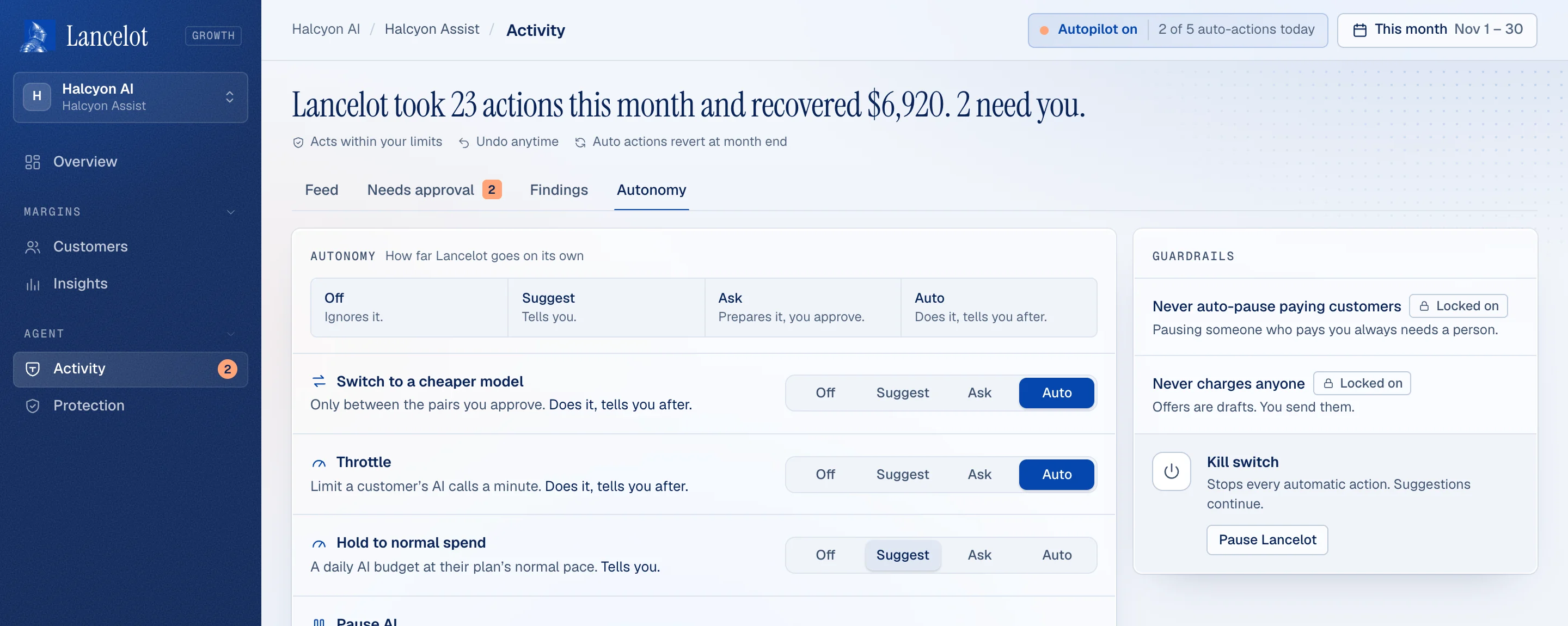
These are your agent's permissions, one action at a time. Every action starts at Suggest,
and you raise it to Ask or Auto once you trust it, or switch it off.
Lancelot won't take this action for any customer.
The fix shows up in your feed with its reasons. Your app stays as it is until you act.
Lancelot sets up the fix and waits up to 72 hours for your approval.
Lancelot makes the change on its own, within the guardrails below, and tells you. You can undo it in one click.
You send upgrade and top-up offers yourself, so those two stop at Ask.
The other four end at the start of next month unless you renew them.
Gives the customer a daily AI budget at the pace that's normal for their plan.
Up to Auto
Limits a customer to a set number of AI calls a minute. It's the fastest way to stop a runaway loop.
Up to Auto
Moves a customer's calls to a cheaper model you've approved in advance.
Up to Auto
Turns off AI for one customer. Lancelot asks first if they're paying you.
Up to Auto
Lancelot drafts an upgrade offer with your Stripe Payment Link, and you send it.
Up to Ask
For customers who need extra usage this month rather than a bigger plan. Lancelot drafts it, and you send it.
Up to Ask
Your levels set what Lancelot may do, and these guardrails decide when it has to check with you anyway.
Together, they give the agent a governance framework you never had to write, and your feed shows which rule applied.
They're paying you, and the fix is a pause.
Lancelot isn't confident in its diagnosis.
You undid this fix for the customer before.
Lancelot has used today's 5 automatic actions. You can set the limit anywhere from 0 to 50.
Lancelot already acted on this customer today.
Your app isn't enforcing changes yet.
The first four send the fix to Ask. The last two drop it back to Suggest.
Pause AI · Birchline
Set to Auto. Waiting for you because Birchline is a paying customer.
Dropped to Ask · paying customer · expires in 72h
Throttle · acct_7Hq2
Set to Auto. Waiting for you because you undid a throttle for this customer on Nov 4.
Dropped to Ask · undone before
Lancelot looks at these within 15 minutes.
customer_costs$156 this month, 80% between 1 and 4 a.m.
customer_revenueFounder, $49 a month
plan_catalogNormal for Founder: under $40 a month
action_historyNo past actions
submit_diagnosisThrottle · high confidence
Read-only tools. At most 4 rounds and 30 seconds.
Auto
High
2 of 5 automatic actions used
Pausing a paying customer always needs your approval.
Ask. Waiting for your approval.
Before
$5.20a day
After
$2.20a day
Saved in 14 days
$42.00
7 days beforeFix applied14 days after
You undid this.
Lancelot will remember.

Lancelot takes up to 5 automatic actions a day unless you change it. The agent switch is your kill switch: turn it off and every fix goes back to a suggestion at once.
automatic actions a day by default. Set it anywhere from 0 to 50.
Approval requests expire after 72 hours.
Suggestions you haven't acted on expire after 7 days.
Suggest on every plan. Ask from Founder. Auto from Growth.
Lancelot acts alone on 2 of 6 actions.
Each request arrives with Approve, Undo and Dismiss buttons, so your team keeps a human in the loop without opening Lancelot.
Requests land in the channel you pick, buttons included.
You get one short email for each request, with the same buttons.
Approve from your phone when you're away from your desk.
Connect Claude or ChatGPT, and approve, dismiss or undo by asking it.
Lancelot drafts upgrade and top-up offers, and you decide whether they go out.
Lancelot makes no charges, refunds or transfers. Offers are links your customer chooses to pay.
Lancelot doesn't touch your plans or prices.
That holds on Auto too.
The SDK fails open, so no customer gets blocked.
Undo restores the previous setting, and every fix ends with the month.
You choose for each action. On Ask, Lancelot is human in the loop: nothing changes until someone on your team approves. On Auto, you're on the loop: Lancelot acts within its guardrails, tells you, and you can undo it in one click.
Only on actions you've set to Auto, and only within the guardrails. Every action starts at Suggest, so Lancelot acts alone only after you raise a level.
Yes. Turn the agent off and every automatic action stops at once. Lancelot keeps suggesting fixes, and you can still approve them yourself.
Undo it in one click and the previous setting comes back. Lancelot remembers the undo and goes back to suggesting that fix for the customer.
Your app keeps working. The SDK fails open, so no customer gets blocked.
No. Lancelot drafts upgrade and top-up offers, and you decide whether to send them.
Throttles, pauses, model switches and spend holds end at the start of next month, unless you renew or undo them sooner.
Growth and above. Founder includes Suggest and Ask.
Yes. Requests arrive in Slack, email or Telegram with Approve, Undo and Dismiss buttons, and anyone who can approve in Lancelot can act on them there. You can also approve from Claude or ChatGPT.
Yes. After an undo, Lancelot only suggests that fix for that customer. Undo it for 2 customers on the same plan and Lancelot only suggests it for the whole plan. Any reason you add is kept as a note.
Yes. Lancelot records every approval, undo, dismissal and automatic action, with who did it and where. Owners and admins on Scale and Enterprise can view, filter and export it.