When a fix needs you, the message arrives in Slack, email or Telegram with Approve and Undo built in.

channels, from Slack and email to SMS and signed webhooks.
kinds of alert go out right away: approvals and critical findings.
your time by default, one digest brings everything else.
on Mondays by default, the week’s margin arrives in one briefing.
AI gross margin last week in this example briefing, up 3 points.

Fixes that wait for you go out right away, with the buttons in the message.
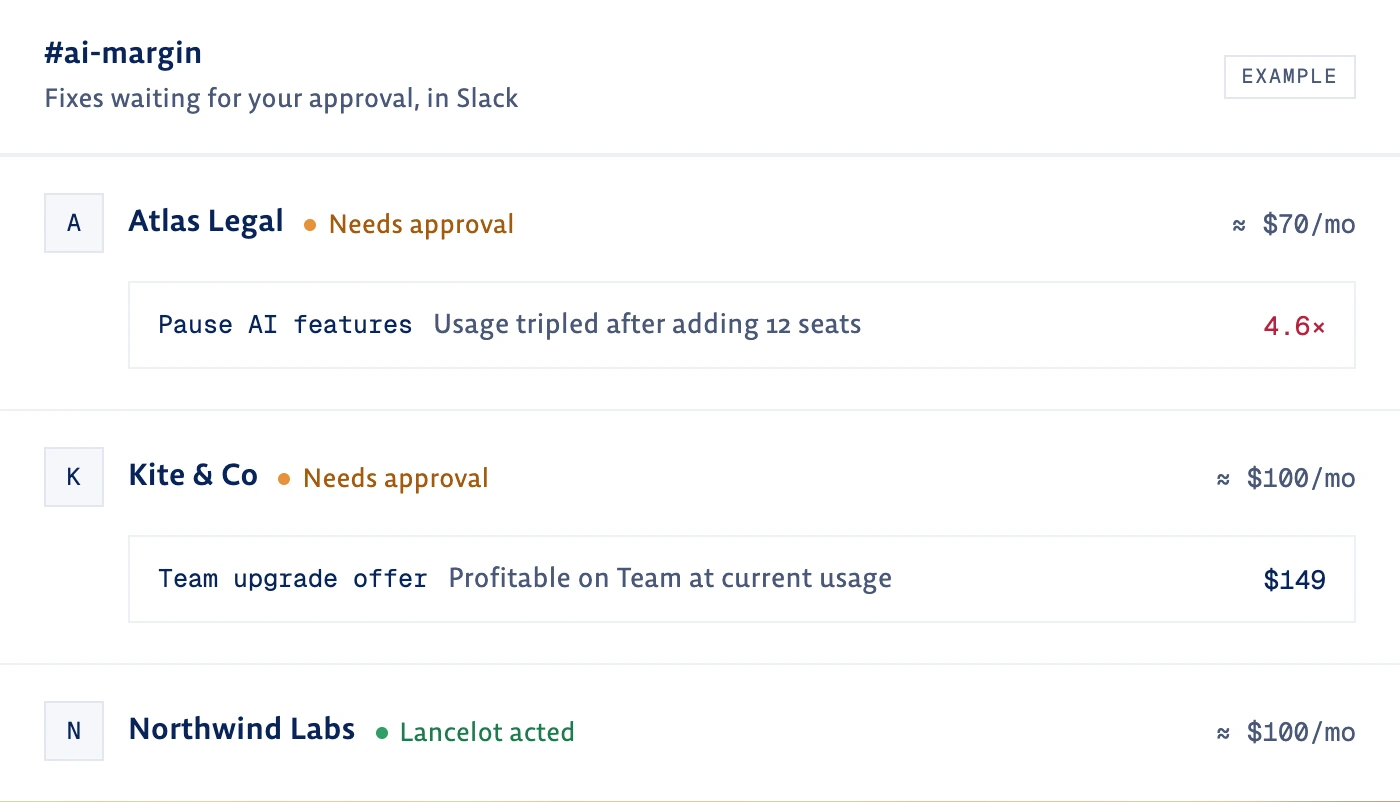
The Lancelot Slack app puts Approve, Undo and Dismiss in the message.
Choose each event type, a minimum severity and quiet hours.
Signed webhooks get every event right away, on Scale+.
Approve, Undo and Dismiss buttons with the Lancelot Slack app. A plain incoming webhook posts the message with a link instead.
Approve and Undo open a confirmation page in Lancelot, so a link preview or a forwarded email can’t approve anything.
Approve, Undo and Dismiss buttons in the chat.
The message, with a link to review it in Lancelot.
Critical alerts only.
Every event as signed JSON, sent right away, for your own tools.
Approve from Claude, ChatGPT or Cursor.
Lancelot checks that whoever clicked belongs to your workspace and can approve. Viewers can’t.
Each button works once, even if two people click at the same moment.
The message updates to show who approved, and Lancelot logs it.
Can’t be undone from a message, because offers are drafts you send yourself.
Send each one right away, add it to the digest, or turn it off: needs approval, Lancelot acted, suggestions, undone or expired, critical findings and other findings.
The channel only hears about serious things.
Pick which actions the channel hears about.
Set in your time zone, and messages wait until morning. Critical alerts still come through by default, and you can turn that off.
8:00 on Monday in your time zone by default, on every channel except SMS.
Last week’s AI gross margin and how it moved, AI cost, what Lancelot recovered, underwater customers, what Lancelot did and what’s waiting for you.
Yes. Connect Slack and Lancelot posts the findings and fixes that need you, with the customer, the cost and the reason. With the Lancelot Slack app, each message has Approve, Undo and Dismiss buttons. Everything else arrives in one daily digest.
A budget alert from your provider tells you the whole account passed a number. Lancelot’s alerts name the customer, what changed and what it costs you, and they arrive with a fix you can approve from the message.
Slack, email, Telegram, Discord and Microsoft Teams on every plan, SMS on Growth and higher, and signed webhooks on Scale and higher. You can connect several at once, and each channel has its own settings for what it hears about and when.
Yes. With the Lancelot Slack app, alerts carry Approve, Undo and Dismiss buttons. Only people in your workspace with approval rights can use them, each button works once, and the message updates to show who did what.
No. By default, only fixes waiting for your approval and critical findings arrive right away. Everything else goes into one digest a day, and you can change that for each channel or set quiet hours.
Your AI margin for the week, AI cost against the week before, what Lancelot did and recovered, what’s waiting for you, who’s losing you money, where the spend went, and one recommended next step. It arrives Monday at 8:00 in your time zone.
Yes. Approve and Undo buttons in an email open a confirmation page in Lancelot, and nothing changes until you confirm there. A link preview or a forwarded email can’t approve anything by accident.
Yes. Set quiet hours in your time zone and alerts wait until they end. Critical alerts can still come through, and you can turn that off too.
Yes, on Scale and higher plans. A webhook channel receives every event right away as signed JSON. Each request carries a Lancelot-Signature header to verify, and a delivery ID that stays the same across retries so you can ignore duplicates.
Only critical alerts: findings at the highest severity, and fixes for them that wait on your approval. Digests, lower-severity alerts and the Monday briefing never go to SMS. SMS is on Growth and higher plans.